
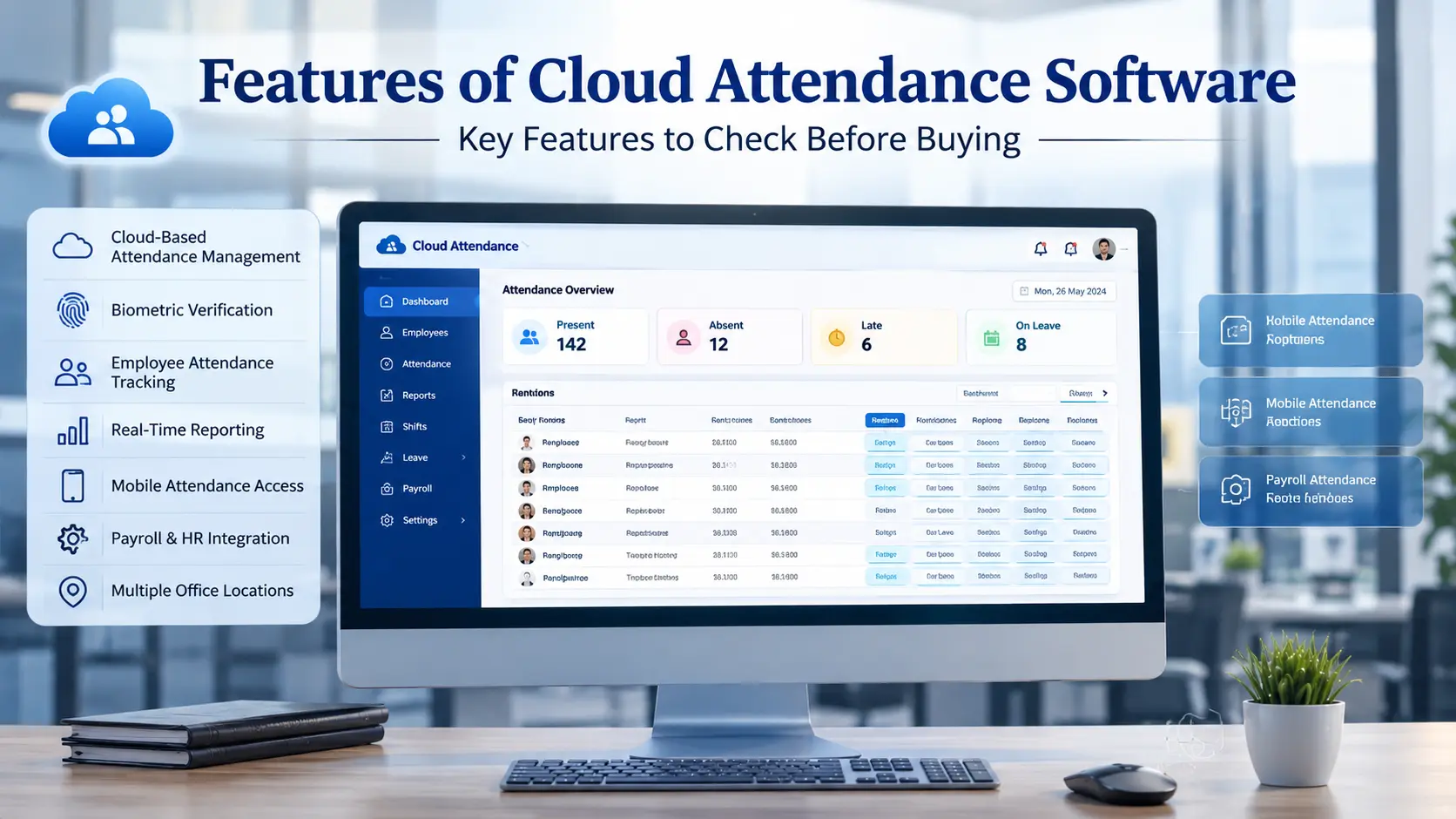
What Features Should You Check Before Buying Cloud Attendance Software?
Attendance software platforms often look very similar on the surface. They promise to track time, manage employees, and organise records. However, the actual difference between systems usually lies in the specific features that handle daily attendance operations, employee management, payroll preparation, reporting, and integrations.
Evaluating the right features of cloud attendance software is critical because a missing workflow can create hours of manual work for an HR department. This article explains the key cloud attendance software features buyers should evaluate to ensure the system matches their actual business requirements.
What Are the Most Important Features of Cloud Attendance Software?
Before purchasing a system, businesses need to evaluate how the software handles different stages of the attendance cycle. A complete system should manage data from the moment an employee punches in until the final payroll report is generated.
The main feature groups to evaluate include:
-
Attendance capture and biometric integration
-
Real-time tracking and dashboard visibility
-
Leave management and approval workflows
-
Shift management for flexible schedules
-
Payroll integration and hour calculations
-
Employee self-service portals
-
Mobile access and remote tracking
-
Automated reporting and data exports
-
Multi-location management capabilities
-
HRMS and API integration
Understanding these features of cloud attendance software will help you choose a platform that genuinely reduces administrative work.
Read Related Guide: Employee data security in cloud attendance systems
Biometric Attendance and Device Integration
The foundation of any attendance system is how it captures employee punch data. When evaluating biometric attendance software features, businesses should look closely at how the software interacts with the physical hardware.
A robust system will support fingerprint attendance and face recognition devices. More importantly, it must offer reliable biometric device integration so that punch data automatically syncs with the online platform. Buyers need to check how the system handles multiple attendance devices and what happens when a device temporarily goes offline. A good system will store the punches locally on the device and push the data to the cloud automatically once the internet connection is restored.
Before buying, verify whether the attendance software with biometric integration is compatible with the devices you already own or plan to install.
Real-Time Attendance Tracking and Employee Status
Real-time attendance tracking features remove the need to wait for end-of-day reports to understand workforce availability. A highly functional real-time attendance dashboard provides immediate visibility into daily operations.
HR managers and department heads should be able to instantly see a list of present employees, absent employees, late arrivals, and early departures. The dashboard should also flag missed punches and show exact check-in and check-out times. By offering department-wise visibility and current attendance status, employee attendance tracking features allow managers to identify staffing shortages or punctuality issues early in the day and adjust workflows accordingly.
Leave Management and Attendance Regularisation
Attendance is not just about tracking present days. Managing absences is equally important. When comparing attendance software features, buyers should check whether leave management is built directly into the system to avoid using separate tools.
Attendance software with leave management should handle the entire leave application and approval workflow. Employees need a clear view of their leave balances and available leave types. Managers need the ability to approve or reject requests quickly based on automated holiday calendars.
Additionally, the software must handle attendance regularisation. If an employee forgets to punch in, they should be able to submit a missed-punch correction request. The software should keep a complete approval history for future audits.
Shift Management for Different Work Schedules
Many businesses do not operate on a single 9-to-5 schedule. Attendance software with shift management is essential for retail stores, factories, and growing corporate offices that operate on varied timings.
Effective attendance management software features must support multiple shifts and rotational shifts. HR teams need the ability to handle shift assignment easily and manage sudden shift changes. The system should allow administrators to configure weekly offs, night shifts, and specific late or early rules. Setting grace periods for late arrivals is also an important feature to prevent unnecessary salary deductions for minor delays. Finally, the system should generate accurate shift-wise attendance reports to help managers track punctuality across different working groups.
Payroll Integration and Working-Hour Calculations
Attendance data is only useful if it can be processed for salary payouts. Attendance software with payroll integration is one of the most critical buying considerations because it directly impacts financial accuracy.
The software must accurately prepare all payroll-related data. This includes calculating total working hours, tracking overtime, adjusting for approved leave, and calculating deductions for absences or late marks. The system should distinguish between paid and unpaid leave and provide clear attendance summaries.
When reviewing attendance management software features, check the specific export options. Find out if the software can export data in formats accepted by your payroll provider, or better yet, if it offers API connectivity to sync directly with your existing payroll software.
Employee Self-Service Features
Relying on HR for every attendance query is inefficient. Attendance software with employee self-service solves this problem by giving staff direct control over their own data.
Through a dedicated portal, employees should be able to view their personal attendance records and check their available leave balances. They should be able to submit leave applications, request attendance regularisation for missed punches, and check their upcoming shift information. They also need visibility into their request and approval status. In some systems, employees can even access payslips or payroll-related data if that functionality is supported.
These attendance software features drastically reduce repetitive HR queries and empower employees to manage their own time.
Mobile App and Remote Attendance Access
Modern workforces require flexible accessibility. Attendance software with a mobile app allows employees and managers to interact with the system without needing a desktop computer.
Mobile attendance access provides a quick way for staff to get an employee attendance view and submit leave requests on the go. Managers benefit from receiving immediate attendance notifications and the ability to process manager approvals from anywhere. For HR teams, remote access ensures they can monitor operations even when out of the office.
It is important to distinguish mobile access from biometric attendance. While some systems offer GPS-based mobile attendance for field staff, this is a separate feature from simply using the app to check records and approve leaves.
Attendance Reports and Automated Reporting
Data is useless if it cannot be analysed. Attendance reporting software must provide clear, actionable insights into workforce behaviour.
A comprehensive system will offer a variety of standard reports, including daily attendance, monthly attendance, late-coming reports, and absence reports. It should also track financial metrics through an overtime report, a leave report, and a detailed working-hours report. Good attendance software features allow administrators to filter these insights through department-wise reports, employee-wise reports, and shift-wise reports.
Automation is just as important. Attendance software with automated reports should allow HR to configure scheduled reports that generate automatically and arrive via email. Look for systems that support custom date ranges, advanced filters, and the ability to export to Excel, CSV, or PDF formats.
Multi-Location Attendance Management
For companies operating across multiple branches, managing data locally at each site is a major administrative burden. Attendance software for multiple locations centralises this process.
The system should allow a company to register multiple branches and assign location-wise employees to specific location-wise devices. All data should flow into a centralised dashboard visible to the head office. At the same time, the software must support branch-level administrators who can only view and manage their specific site.
Important attendance management software features for expanding businesses include location-wise reports and the ability to handle employee transfers between locations without losing historical data.
HRMS and API Integration
Attendance systems rarely operate in isolation. They need to share data with other business tools. Attendance software with HRMS integration ensures that employee profiles are consistent across all platforms.
Evaluate whether the system offers attendance software with API integration. API availability allows for seamless employee data synchronisation and automated attendance data transfer between systems. Automated data exchange eliminates the need for manual data entry, reducing errors and saving time. Before purchasing, verify exactly which integrations are supported and whether the software can connect smoothly with your existing business systems.
What Should You Check Before Buying Attendance Software?
Knowing the features to look for in attendance software is only the first step. To make a practical decision, use this checklist to evaluate what to look for in attendance management software based on your operational needs:
-
Does it support the required biometric devices?
-
Does it provide real-time attendance visibility?
-
Can it handle your specific shift structure and grace periods?
-
Is leave management included in the platform?
-
Can attendance data flow accurately into your payroll system?
-
Does it provide employee self-service to reduce HR workload?
-
Is there a mobile app for remote access and approvals?
-
Can multiple locations be managed from a single dashboard?
-
Are reports customisable and exportable?
-
Does it integrate with your current HRMS?
-
Is an API available for future software connections?
-
Can the system support your expected employee growth?
Checking these cloud attendance software features will ensure you choose a platform built for your actual workflows.
How to Choose the Right Cloud Attendance Software for Your Business
Choosing the right features of cloud attendance software depends entirely on the size and structure of your organisation.
For a small office, the priority might simply be biometric attendance capture, basic leave management, standard reports, and a payroll export feature.
A growing company will require more advanced cloud attendance software features, such as a mobile app for remote approvals, complex shift management, employee self-service portals, and direct payroll integration.
A multi-branch business requires enterprise-level features. They need a central dashboard, the ability to manage multiple locations, strict role-based administration for branch managers, and deep HRMS or API integration to keep data synchronised across regions.
Ready to build a faster, more secure attendance network?
Call Us: +91-09972047466 Available for urgent security needs & installation support
Email: contact@valuablecctvsolution.com
Visit Our Office: 50/6 5th main road, 12th Cross Rd, Wilson Garden, Bengaluru, Karnataka 560027
Google Maps: Check Our Google My Business Listing for Reviews
Frequently Asked Questions About Cloud Attendance Software Features
What are the most important features of cloud attendance software?
The most important features include biometric device integration, real-time tracking, leave management, shift scheduling, automated reporting, and payroll integration.
Does attendance software support biometric devices?
Yes, quality software supports biometric integration. It connects directly with fingerprint and face recognition devices to automatically sync punch data to the cloud.
Can attendance software integrate with payroll?
Yes. Good software calculates working hours, overtime, and leave, and then exports this data in payroll-ready formats or syncs directly via an API.
Can cloud attendance software manage multiple shifts?
Yes. Feature-rich systems allow administrators to create multiple shifts, assign rotational schedules, and define specific rules for late arrivals and grace periods.
Can employees apply for leave through attendance software?
Yes. Systems with employee self-service allow staff to check their leave balances, apply for time off, and track their approval status directly through a web portal or mobile app.
Can attendance software manage multiple locations?
Yes. Advanced software can connect biometric devices from multiple branches to a single centralised dashboard while allowing branch managers to oversee their specific locations.
Does attendance software provide real-time attendance reports?
Yes. Cloud systems feature real-time dashboards that immediately display present staff, absent employees, and late arrivals without waiting for end-of-day data processing.
Can attendance software integrate with HRMS?
Yes. Many platforms offer API availability or native integrations to sync employee data and attendance records seamlessly with existing HR management systems.
Final Takeaway: Focus on Features That Match Your Attendance Process
Choosing the right platform goes far beyond looking at the dashboard interface or the physical biometric device. Businesses must carefully evaluate the features of cloud attendance software to ensure the system can actually handle their specific shift rules, leave policies, payroll workflows, and reporting requirements. By verifying these capabilities beforehand, companies can invest in a solution that genuinely automates their daily attendance operations and supports long-term business growth.

Siddu Swami Hiremath is the Founder & CEO of Valuable Security Solution, a Bengaluru-based company specializing in CCTV camera installation, electronic security systems, and surveillance solutions. With over 15 years of hands-on experience in the security industry, he has helped homeowners, businesses, apartments, offices, schools, and industrial facilities implement reliable CCTV systems, access control systems, biometric attendance solutions, fire alarm systems, and burglar alarm systems. His expertise in designing customized security solutions has made Valuable Security Solution a trusted name for CCTV installation in Bangalore. Known for same-day site surveys, professional installation, best-price guarantee, and 24/7 technical support, Siddu is committed to delivering advanced security solutions that ensure long-term safety, protection, and peace of mind.