
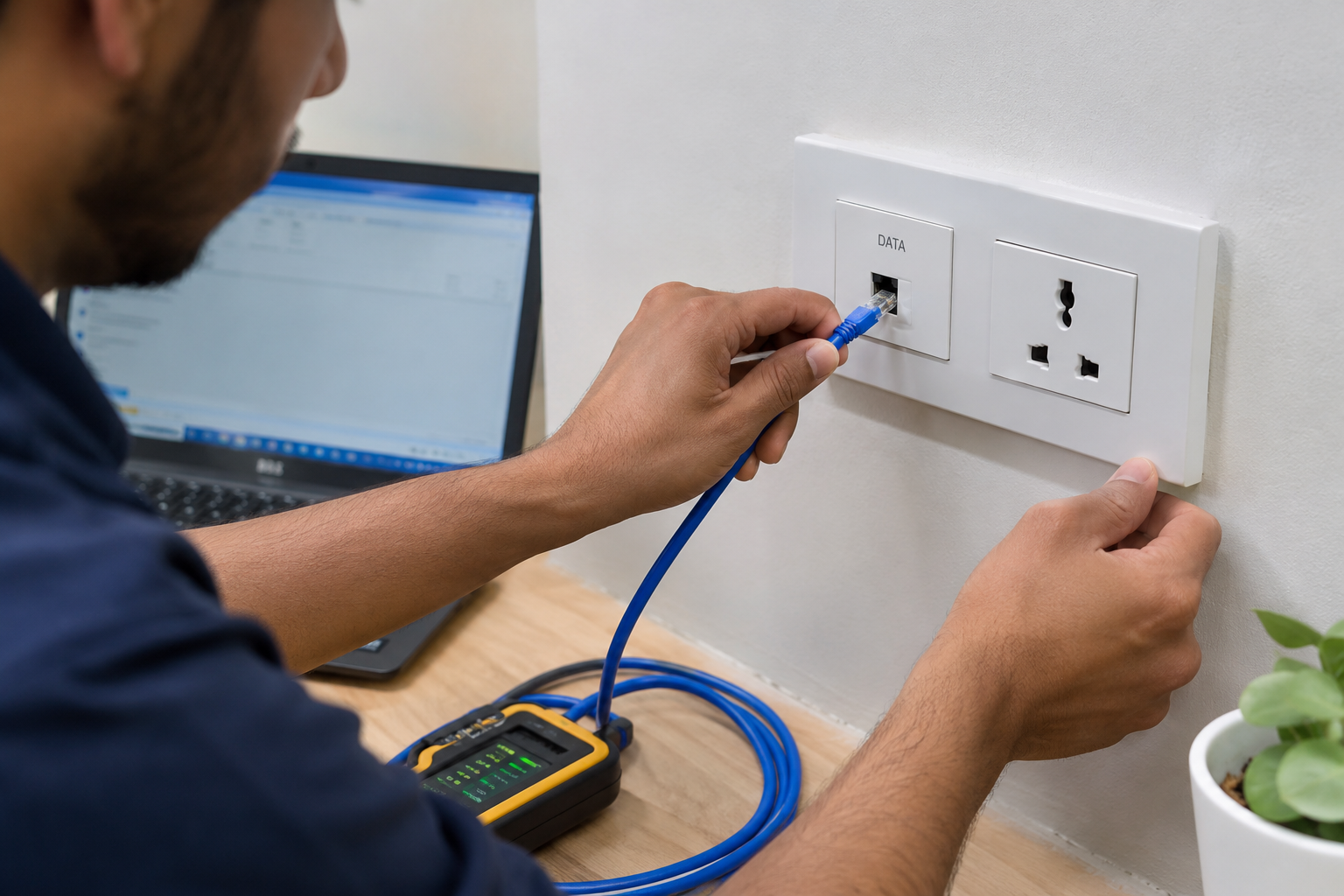
Why Is Your Ethernet Wall Socket Not Working? 7 Common Causes in Bangalore
1. Introduction – When a Dead LAN Socket Paralyses Your Bangalore Workplace
You sit down at your workstation in Wilson Garden, plug your laptop into the RJ45 wall outlet, and prepare for a critical client video meeting or a massive database backup. Instead of high-speed Gigabit connectivity, your screen displays a frustrating warning: “Network Cable Unplugged” or “No Internet Connection.”
In tech-driven hubs across Bangalore—from Wilson Garden and Koramangala to Indiranagar and CBD commercial districts—a sudden network drop stalls productivity. Industry research shows that IT network downtime costs mid-sized businesses anywhere between ₹25,000 to over ₹1,500,000 per hour in operational friction, delayed transactions, and idle payroll. While Wi-Fi is fine for mobile phones, desktop workstations, IP phones, and CCTV systems require the low latency of a wired Cat6 connection.
This guide breaks down why your ethernet wall socket not working, how to quickly isolate the root cause, and when to call Valuable Security Solution for professional certified structured cabling services.
Emergency On-Site LAN Support in Bangalore: Don’t let a dead network drop stop your business operations. Speak directly with our low-voltage technical team at +91 95916 47466 to schedule an immediate diagnostic inspection!
2. How Do You Quickly Test If the Problem Is the Socket or Your PC?
Before scheduling a physical cable repair, run this simple 60-second hardware triage matrix to verify whether the failure lies within your computer, your patch cord, or the wall plate I/O point.
+---------------------------+-----------------------------------+-----------------------------------+
| Diagnostic Test Step      | Result A (Issue is PC/Patch Cord)| Result B (Issue is Wall Socket)  |
+---------------------------+-----------------------------------+-----------------------------------+
| 1. Swap Patch Cable       | Internet returns with new cable   | Still shows "Cable Unplugged"     |
| 2. Test Secondary Laptop  | Second PC connects instantly      | Second PC also gets no connection |
| 3. Check NIC LED Lights   | Amber/Green lights blink normally | Both Link/Activity LEDs remain OFF|
| 4. Verify Local IP Status | Valid IP assigned (e.g. 192.168.x)| APIPA error code (169.254.x.x)    |
+---------------------------+-----------------------------------+-----------------------------------+
Step-by-Step Isolation Protocol:
-
Swap the RJ45 Patch Cord: Flexible patch cords get run over by office chairs and bent behind desks. Replace your current cable with a known, working Cat6 patch cord.
-
Connect a Different Laptop: Plug a second laptop into the suspect wall outlet. If it also fails, your PC’s Ethernet port is fine, and the wall jack or internal wiring is at fault.
-
Inspect the Ethernet Port LEDs: Look closely at the physical LAN port on your computer or docking station. A solid green light indicates a physical link, while a flickering amber light shows data activity. If both lights are completely unlit, no electrical signal is passing through the socket.
-
Check Command Prompt (
ipconfig): Open Command Prompt on Windows and typeipconfig. If your IP address begins with169.254.x.x, your PC is not receiving an IP from your router/DHCP server due to a physical wiring break or unpatched network switch port.
If you suspect broader signal degradation, explore our low-voltage network testing protocols for technical verification.
3. The 7 Common Causes Why Your Ethernet Wall Socket Is Dead
When the ethernet wall socket not working issue persists across multiple devices, one of these 7 real-world physical or logical infrastructure failures is usually responsible:
1. Corroded or Improperly Terminated Keystone Jack
The internal RJ45 keystone module behind your wall plate uses eight tiny copper wire slots. If the installer didn’t punch down the wires tightly using the proper T568B wiring scheme, wires can loose-fit over time. Additionally, high monsoon humidity across Bangalore accelerates copper oxidation, causing silent pin corrosion and connection drops.
2. Severed Wires Inside Wall Conduits
During interior office re-configurations, modular furniture setup, or electrical conduit additions in Wilson Garden commercial buildings, carpenters and electricians frequently drill into concealed PVC wall conduits, unknowingly severing or nicking the internal Cat6 copper pairs behind drywall.
3. Unpatched Port at the Server Rack
In many Bangalore commercial offices, wall sockets are installed during civil construction, but the corresponding end at the central server rack remains unpatched. If the patch panel port is not physically connected to an active network switch using a patch cord, the wall socket remains completely dead.
4. Bent or Snapped Female Port Pins
Forcefully yanking an RJ45 connector or tripping over a network cord bends or snaps the tiny copper spring pins inside the female wall plate port. If even one of the eight pins fails to contact the male connector, the port drops from Gigabit speed to zero.
5. Managed Switch Port Isolation & VLAN Lockouts
Modern managed switches continuously monitor network integrity. If a device triggers a network loop, IP conflict, or port security violation, the switch automatically disables that specific port at the software level, leaving the wall socket without data flow.
6. Over-Stretched or Kinked Cat6 Cabling
Cat6 copper cables have strict minimum bend-radius rules. If low-voltage installers tightly bend cables around structural metal studs or over-fill ceiling conduits, internal copper pairs experience Near-End Crosstalk (NEXT), resulting in intermittent packet loss or total link failure.
7. Pest Damage or Environmental Leakage
Unsealed ceiling plenums and floor raceways are vulnerable to rodent damage. Rats frequently chew through cable jackets, severing internal twisted pairs. Furthermore, condensation dripping from ceiling AC drain pipes into wall cavities corrodes concealed copper wire runs.
Need complete infrastructure replacement? Learn more about our Cat6 network installation and repair services.
4. DIY Quick Fixes vs. When to Call a Professional Technician in Bangalore
What You Can Safely DIY:
-
Reseat Connections: Unplug and firmly re-insert both ends of the patch cable into the wall socket and your laptop until you hear an audible click.
-
Restart Desktop Network Adapters: Right-click your network icon in Windows, select Disable, wait 10 seconds, and click Enable.
-
Visual Inspection: Use a flashlight to peek inside the female wall jack. If pins look covered in dust or lint, gently clean them using a dry cotton swab or compressed air.
When You Need a Professional Engineer:
DIY attempts to re-crimp or punch down wires without specialized tools often cause split pairs, high latency, and permanent port failure. You require certified assistance when:
-
The keystone module needs replacing or re-terminating with an impact 110 punch-down tool.
-
The wire is snapped deep inside wall conduits, requiring a Time-Domain Reflectometer (TDR) wire mapper to locate the exact break distance.
-
New Cat6 cable drops must be pulled through congested raceways using fish tape.
Partner with our professional network troubleshooting team to restore your physical network layer without operational risk.
5. Why Commercial Spaces in Wilson Garden & Bangalore Need Certified Cat6 Repair
Commercial properties in Wilson Garden, Koramangala, and central Bangalore feature a mix of renovated heritage buildings and high-density tech parks. These environments present unique infrastructure challenges:
-
Congested Vertical Risers: Older multi-tenant buildings in Wilson Garden often have overcrowded electrical shafts, creating severe electromagnetic interference (EMI) for unshielded LAN cables.
-
Shared Raceway Wear: High tenant turnover leads to abandoned, cut, or mislabeled cables cluttering ceiling raceways.
At Valuable Security Solution, we deliver localized, rapid-response network troubleshooting. Professional network cabling and I/O point repairs in Bangalore typically range from ₹200 to ₹850 per node/point for re-termination, testing, and re-labeling, depending on access complexity and layout conditions.
Our team performs complete digital line tracing, replaces degraded keystone jacks with high-grade solid copper modules, dresses server rack patch panels, and certifies every connection with professional Fluke cable analyzers.ΩFast Local Service Book an expert technician for Ethernet socket repair in Wilson Garden, Bangalore today!
6. FAQs: Voice Search & AI Mode Optimized
Q1: Why is my Ethernet wall socket not working while the Wi-Fi is fine?
Wi-Fi operates wirelessly via ceiling access points, whereas an Ethernet wall socket relies on a direct copper path (Cat6 cable, punch-down keystone, patch panel port, and switch). If the physical copper wire inside the wall conduit is cut, loose, or corroded, the wall socket fails even while Wi-Fi remains fully functional.
Q2: How do I fix a dead RJ45 wall socket in my Bangalore office?
First, test the socket with a known working patch cable and secondary laptop. If there is still no link light, visually check the socket for bent pins. If the pins look intact, the issue is usually an unpunched wire or an unassigned switch port at the central rack. Scheduling an expert for Cat6 I/O point repair in Bangalore ensures safe diagnostic tracing with a digital wire mapper.
Q3: What is the average cost to fix a LAN connection in an office in Bangalore?
Professional network point repair, keystone jack re-termination, and line testing in Bangalore generally range between ₹200 and ₹850 per point for commercial setups, depending on site accessibility and repair requirements. Valuable Security Solution offers transparent on-site inspection rates and flat-rate point repair options.
Q4: Who provides emergency Ethernet socket repair in Wilson Garden, Bangalore?
Valuable Security Solution offers rapid, on-site Ethernet socket repair in Wilson Garden, Bangalore, specializing in office fit-outs, retail outlets, and residential network points.
Q5: What causes an RJ45 wall socket to suddenly stop working after an office renovation?
Renovation work frequently damages concealed cabling. Drywall screws, partition installations, or over-stretching cables behind modular desks can nick or sever internal copper pairs inside wall conduits. A professional TDR wire mapping test quickly pinpoints the exact break location behind your walls.
7. Conclusion & Conversion-Focused Call to Action
A single non-working Ethernet wall socket can disrupt critical office workflows, leading to expensive downtime and unnecessary frustration. By understanding the common causes from loose keystone terminations to conduit wire breaks—you can quickly troubleshoot basic issues or call in specialized technicians when physical infrastructure repairs are required.
Don’t let dead network drops slow down your business operations. Trust Bangalore’s low-voltage networking specialists to diagnose, repair, and certify your network points.
-
📞 Call Valuable Security Solution Today: Contact our lead infrastructure team directly at +91 95916 47466 for prompt on-site LAN socket repair across Bangalore!
-
📍 Visit Us: https://valuablecctvsolution.com/contact-us/
What network connectivity challenges is your office facing today? Share your thoughts or questions in the comments below, and our networking experts will be happy to assist!

Siddu Swami Hiremath is the Founder & CEO of Valuable Security Solution, a Bengaluru-based company specializing in CCTV camera installation, electronic security systems, and surveillance solutions. With over 15 years of hands-on experience in the security industry, he has helped homeowners, businesses, apartments, offices, schools, and industrial facilities implement reliable CCTV systems, access control systems, biometric attendance solutions, fire alarm systems, and burglar alarm systems. His expertise in designing customized security solutions has made Valuable Security Solution a trusted name for CCTV installation in Bangalore. Known for same-day site surveys, professional installation, best-price guarantee, and 24/7 technical support, Siddu is committed to delivering advanced security solutions that ensure long-term safety, protection, and peace of mind.